So far in this series on AI, we have introduced AI infrastructure and explained some key terms and acronyms to know. In this article, we will dive a little deeper into the AI network component and discuss important considerations in building a network to support your AI strategy. Because as you know, you can have a spectacular, high-value business application, but if your network doesn’t perform under load … well, you know the rest.
AI Networking Overview
As a network engineer, I always start with two foundational questions when designing a network solution or planning connectivity for a workload. First, what components need to communicate and for what purpose? Second, what are the specific requirements for this connectivity? Requirements might include factors like throughput, latency, Quality of Service (QoS), security, forwarding, and load balancing. Before we dive into the networking requirements specific to AI workloads, let’s begin by discussing the first question: identifying which components need to communicate and understanding the purpose.
In an AI environment, back-end GPU networking with RDMA enables AI workloads to leverage parallel computing by utilizing the combined power of multiple GPUs, not just within a single server but also across servers within an AI cluster. Instead of relying on a single GPU for processing, workloads are split into smaller data chunks that are distributed across multiple GPUs. Each GPU processes its chunk in parallel, and the results are later combined to produce the final output.
This parallel approach significantly boosts processing performance for many AI tasks compared to using just a single GPU. Later in this post, we’ll explore the technologies that make it possible to efficiently transfer data between GPUs across the cluster, enabling efficient connectivity, communication and collaboration among GPUs for large-scale AI workloads.
Figure 1. Example of networking in an AI Cluster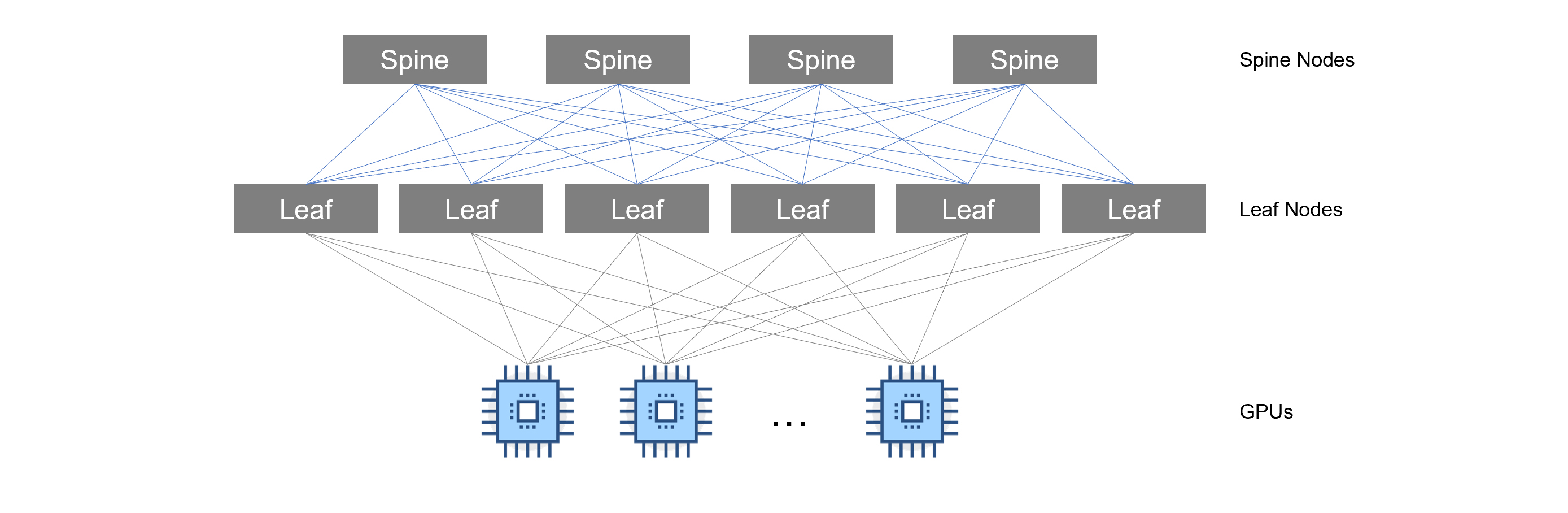
In this example, servers are all connected to a backend network (discussed later in this blog). This network segment is primarily used for GPU-to-GPU communication which is required for parallel computing.
Parallel computing is crucial for the most intensive phase in the AI lifecycle, Model Training. It’s been said that if ChatGPT was trained on a single GPU, training times could be months, or even years, longer than if trained using multiple GPUs in an AI cluster. We’ll discuss the AI workload types / phases in the next section.
Understanding Requirements Based on AI Lifecycle
Now that we have a high-level understanding of the communication required for parallel computing, let’s discuss the second question: what are the requirements? Requirements for AI networking are determined just like any other IT system—based on the workload demand. Some workloads place a higher demand on bandwidth than others; some are more sensitive to latency (delay measured in microseconds or milliseconds); and some require higher throughput rates (as measured in GB/second or TB/second). Load balancing considerations may also have to be taken to avoid links from becoming oversaturated. Let’s discuss the different phases of AI and the network requirements for each phase.
Figure 2. AI Lifecycle Phases
Data Preparation
Quality data is key for any AI solution. This phase in the lifecycle involves cleaning, transforming, and organizing data for AI. Most organizations will organize their data into a Data Lake, Distributed file system, or in Object Storage. During this phase, you may be moving data from different locations. While this process is not latency sensitive, you still want to ensure you have adequate bandwidth to support any file transfers that may be taking place. This ensures data transfer completes in a timely manner. Overall, the requirement on the network is considered low.
Model Selection
Model selection primarily involves testing different algorithms and configurations using pre-processed or pre-loaded data. Since this stage typically operates on data already available locally (e.g., within the compute environment), it does not usually require significant data transfer across the network. Therefore, the demand for networking resources during model selection is relatively low compared to other stages, such as data ingestion, distributed training, or model deployment.
AI Training
In the AI Training phase is where network requirements are critical. During this phase, your backend network must support high bandwidth and throughput, while also providing ultra-low latency. In this phase, data is fed in and parameters are being calculated by the AI model.
The following traffic flows are seen during AI Training:
- GPU-to-GPU communication for parallel computing
- Node-to-Node communication for data transfer
The network requirements for this phase are:
- High throughput / low latency: speeds anywhere from 100GB/s – 800GB/s (and more in the future) must be achieved to ensure AI model training does not get delayed due to bottlenecks or congestion in the network.
- Traffic Priority / Congestion Control: Mechanisms such as Priority Flow Control (PFC), QoS and dynamic load balancing are crucial to avoid bottlenecks and congestion during AI training.
- Scalable and Adaptable: Your network should be built so that it can seamlessly scale when network demands increase. You should also have the ability to quickly repurpose or reconfigure your environment on-demand as requirements change.
- RDMA Transport Protocol Support: RDMA (Remote Direct Memory Access) transport is key during model training. We’ll discuss RDMA shortly.
Fine-tuning
For some organizations, instead of building an AI model from scratch, they may decide to utilize an open-source AI model and customize it using their data. This process, known as fine-tuning, involves adjusting the model's hyperparameters and weights to improve performance on a specific task. Fine-tuning uses less data and has shorter training times compared to model training; however, to avoid delays in this process, it’s still recommended that your AI cluster network supports high bandwidth and throughput and low latency.
Inference/Deployment
After an AI model has been trained or fine-tuned, it’s ready for deployment to perform inference. AI inference is the process of applying a trained AI model to new data in order to generate predictions, classifications, or insights. During inference, the model uses the patterns it learned during training to interpret or analyze incoming data, delivering outputs based on what it has been optimized to recognize. Unlike training, inference typically has lower demands on network resources, as it doesn’t involve extensive data transfer or computationally intensive adjustments to the model itself. Instead, it focuses on efficiently processing new inputs to deliver quick, accurate results.
Accelerating AI with Remote Direct Memory Access
We briefly discussed RDMA (Remote Direct Memory Access) earlier in this post. Let’s discuss what RDMA is and some of the other technologies that can be used to transport RDMA. First, let’s look at what DMA or Direct Memory Access is.
DMA (Direct Memory Access)
Direct Memory Access (DMA) is a computer architecture technique that allows peripherals to access system memory directly, bypassing the CPU. It enables faster data transfer between devices, enhancing overall system performance. For example, you have an application that wants to copy data from your hard drive to memory so that it can access the data faster while the application runs.
Figure 3. Direct Memory Access
This copy operation, without DMA, would cause delay because the CPU would have to do all the heavy lifting. What if we could take this same methodology, using a transport layer, and use this in parallel computing so that we could spread data across multiple GPUs for processing without getting bogged down by CPU? This is what RDMA (Remote Direct Memory Access) provides us.
RDMA (Remote Direct Memory Access)
RDMA (Remote Direct Memory Access) is a technology that allows applications to read and write data directly to the memory of a remote system, without involving the CPU or operating system. This provides several benefits, including low latency, high throughput, and reduced CPU utilization.
Figure 4. Traditional Application vs RDMA Application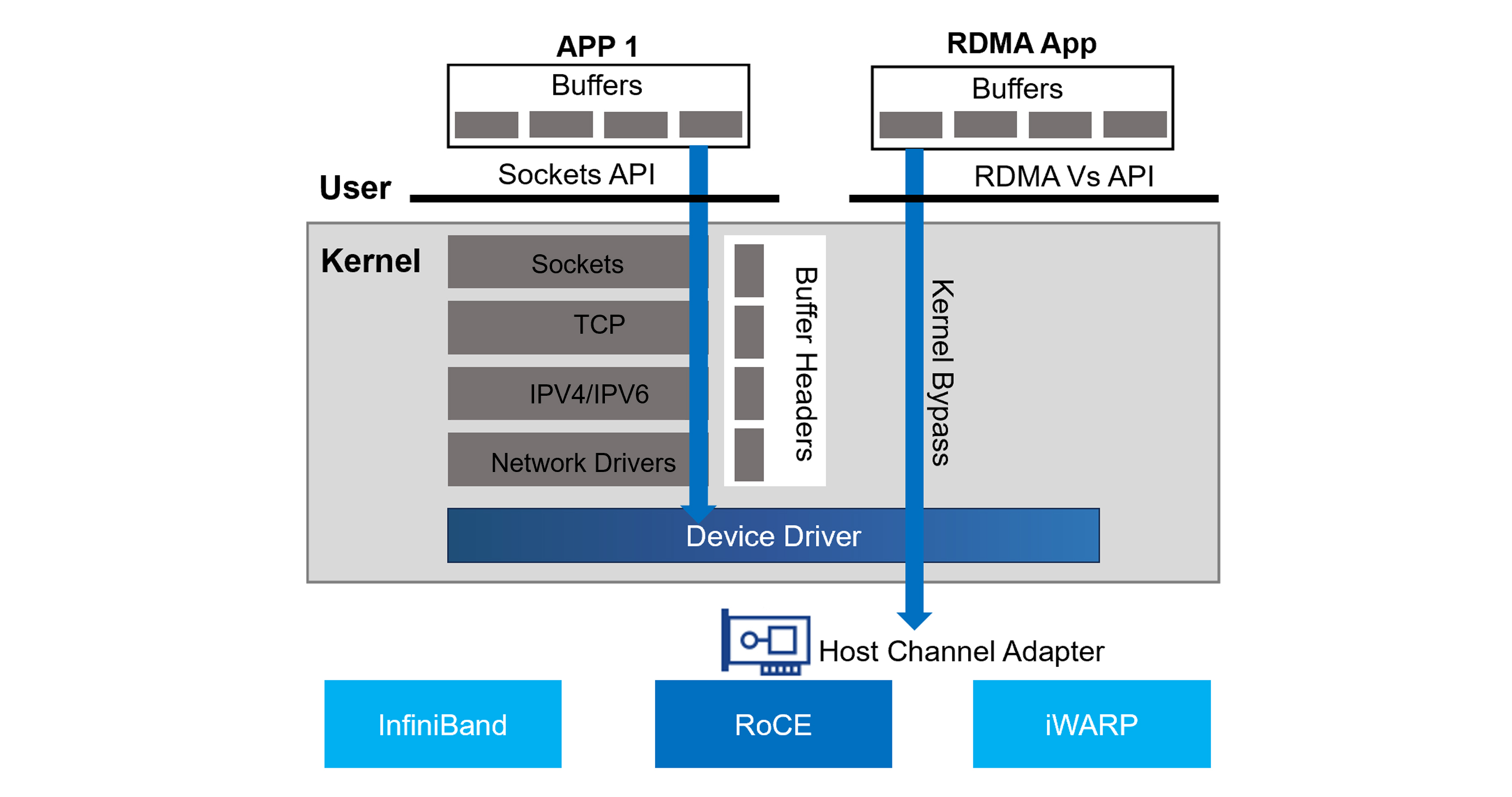
The diagram above shows how a typical application communicates versus an application making use of RDMA. As you can see, the application on the left uses the sockets API to send traffic to a destination. The traffic must get processed by the kernel’s networking stack, which involves the CPU. Eventually the traffic, using the network device driver, sends traffic out the HCA (Host Channel Adapter) towards its destination.
The RDMA application on the right, however, makes use of RDMA. This allows it to bypass the kernel and device driver and send the traffic out the HCA without involving the CPU.
Traffic can be forwarded from host to host via one of the following transport methods:
- InfiniBand: A high-performance networking protocol with native RDMA support.
- RoCE: Allows RDMA over Converged Ethernet networks by encapsulating InfiniBand packets within Ethernet frames.
- iWARP: Another protocol for RDMA over Ethernet, but with a different approach than RoCE (where it is encapsulated within TCP based on standard ethernet with lower throughput and slightly higher latency).
RDMA is commonly used in high-performance computing (HPC) environments, where fast and efficient data transfer between nodes is critical. RDMA is also used for AI clusters, allowing data to be copied to the memory of the GPU for processing. Let’s discuss the different ways we can use RDMA.
GPUDirect RDMA
GPUDirect RDMA (GDR) is a variant of RDMA that allows GPUs to access remote memory directly, without requiring CPU involvement. This enables GPUs to perform computations on large datasets stored on remote systems, without having to first copy the data to local memory.
GDR is particularly useful in deep learning, distributed training, scientific simulations, and other compute-intensive workloads where massive amounts of data need to be processed quickly. By reducing the amount of data that needs to be transferred between nodes, GDR can significantly improve performance and scalability.
GPUDirect Storage
GPUDirect Storage (GDS) is a technology that allows GPUs to access storage devices directly, without going through the CPU or operating system. This reduces the overhead associated with data transfers, resulting in faster performance and lower latency.
GDS is often used in conjunction with GPUDirect RDMA, as it enables GPUs to read and write data directly to storage devices located on remote nodes. This makes it ideal for distributed computing environments, where data is frequently shared across multiple nodes.
RDMA Switching and Forwarding
Now that we’ve covered RDMA and the various ways it can be used in an AI cluster, now let’s cover how RDMA traffic is switched between nodes in an AI cluster.
Figure 5. RDMA Transport using InfiniBand or Ethernet (RoCE)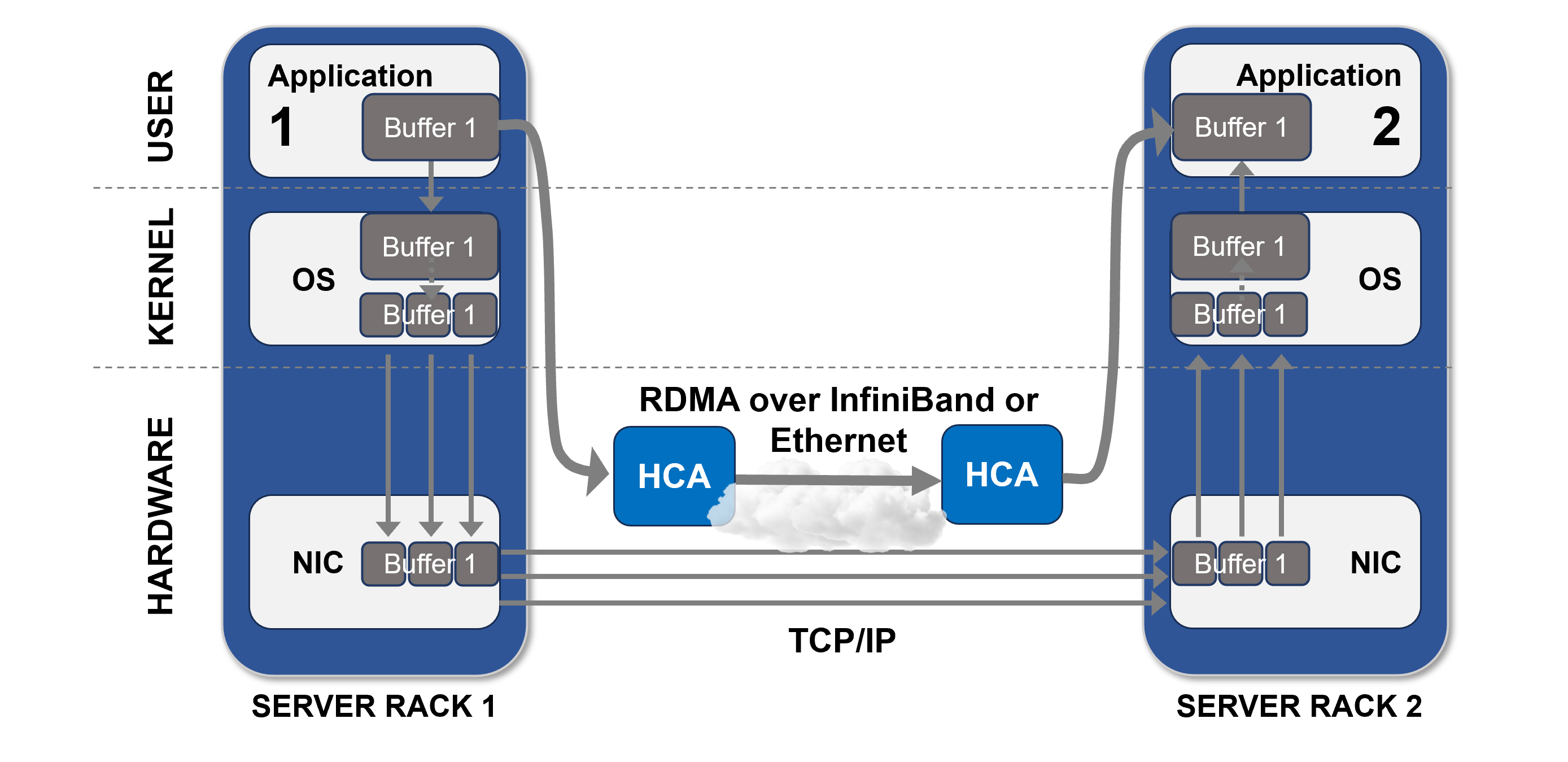
InfiniBand Networking
InfiniBand is a high-speed networking technology that supports the transport of RDMA. It provides low-latency, high-bandwidth connectivity between nodes, making it well-suited for demanding HPC and data center workloads.
InfiniBand networks typically use a spine leaf topology (see Figure 1), which allows for efficient communication between nodes. Its support for RDMA and GPUDirect RDMA makes it a popular choice for distributed computing environments, where low-latency data transfer is essential.
InfiniBand requires specialized switches and HCAs that support the InfiniBand communication protocol.
RoCE v2
Do you remember Fibre Channel over Ethernet (FCoE)? Let me refresh your memory. Fibre Channel is a data transfer protocol used in storage area networks (SAN). Over a decade ago, the industry started adopting protocols that allowed Ethernet to transport Fibre Channel packets. This was due to advances in Ethernet, allowing it to support higher bandwidth and throughput. FCoE was one of the standards that was adopted. It seemed at the time, Ethernet was constantly being adapted to transport traffic of all types and was here to stay.
You’re probably asking yourself, why are we talking about Fibre Channel or FCoE? The reason I bring this up is Ethernet once again is showing why it’s not going anywhere and can play a part in parallel computing.
RoCE (RDMA over Converged Ethernet) is a network protocol that enables RDMA communications over standard Ethernet networks. RoCE v2 is the latest version of the protocol, which builds upon the capabilities of RoCE v1 (MAC with VLAN Tags operating at Layer 2 of ISO-OSI model) by adding support for IP (at Layer 3) and GPUDirect RDMA.
RoCE v2 enables GPUs to communicate directly with each other and with storage devices, eliminating the need for CPU involvement. This results in improved performance, lower latency, and reduced power consumption compared to traditional networking protocols. Using RoCE v2 allows organizations to make use of existing ethernet based switching to transport RDMA traffic.
AI Cluster Network Types
Within an AI Cluster, there are network segments that support different traffic types. In this section, we’re going to discuss the networking types and how they are utilized.
Figure 6. Sample Topology (InfiniBand and RoCE v2)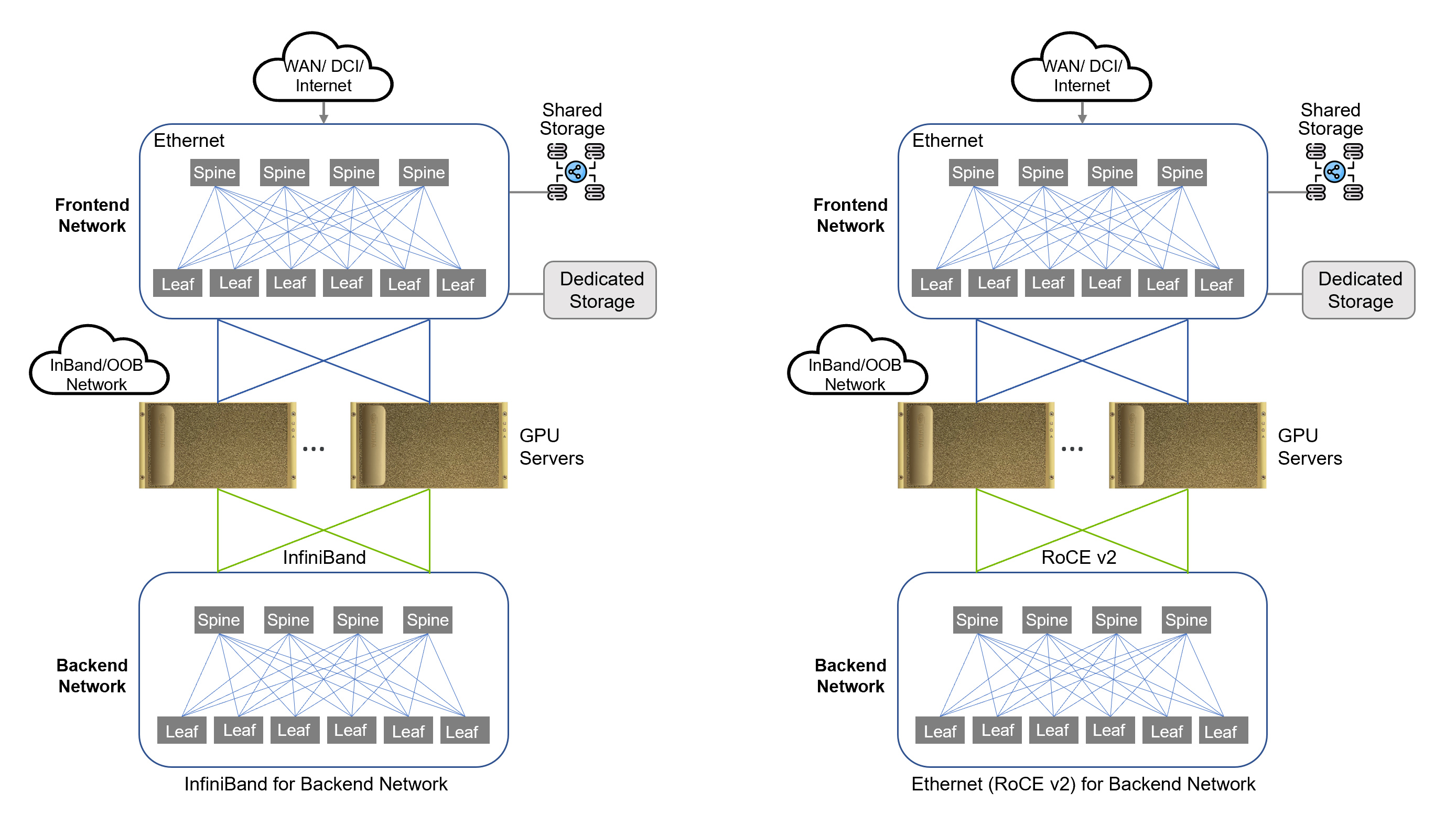
Backend Network
A backend network is designed for GPU-to-GPU communication. This network utilizes RDMA technology such as InfiniBand or RoCE for transport of RDMA traffic. This network must be optimized for high throughput and low latency to ensure the processing of large data sets during AI training, which is an extremely intensive and sensitive task. Latency and packet loss will disrupt training jobs (Fibre Channel traffic has similar requirements). The following traffic is seen on the backend network:
- GPUDirect RDMA
- GPUDirect Storage
- Control Plane Traffic
Frontend Network
The frontend network serves as the entry point into your AI cluster. The frontend network typically does not transport RDMA traffic, therefore this network is usually a traditional Ethernet segment. Since the frontend network is utilized for external storage and AI Inferencing traffic, this network still requires high throughput and low latency.
The frontend network provides the following connectivity:
- External Storage
- Management Traffic
- AI Inferencing Access
Final Thoughts
Designing network infrastructure for AI is a complex subject with many factors to consider. Since deep learning algorithms depend primarily on communications however, it’s safe to say that a high-bandwidth, low-latency network is required. In addition, scalability must be a top priority. Whatever technologies you use, make sure you have a scalable network fabric to support expanding requirements of AI algorithms.
Where you decide to build your AI infrastructure is another important decision. You can build it in the cloud. You can build it in your own data center or in a colocation facility and manage it yourself, or partner with a managed services provider (MSP). Or you can opt to work with a service provider who specializes in offering AI as-a-service. All four have advantages and disadvantages to consider—cost, scalability, management overhead, and more—and selecting the option that is right for you will depend on many factors.
Watch for the next post in this series where will explore the compute and storage components of AI infrastructure. For help with any stage of your AI journey, check out ePlus AI Advanced Services.


